id say start with just making two bodies interact… like thats probably the main ‘’thing’’ to approaching porn, bc like… idk you guys, but i was used just drawing people standing pretty much, and very isolated in their personal space bubble
so try drawing two bodies interacting… whether its like, kissing, or hugging, or leaning on over one another, you know?
like that helps with some things: -breaking out of unconsciously drawing the spine ALWAYS straight like a pole (thus pushing the poses and starting to think of the body as more pliable and really making the most of its range of movement) -getting comfortable with drawing //closeness// which is?? really hard? drawing bodies close is harder than drawing two bodies apart because you have to think of BOTH OF THEM AS MAKING UP ONE SAME POSE which is. hella tough
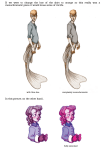
ok some lil explanation doodles, from the start: -no more pole straight spines no more straight anything u wanna go from this
to something more like:
ALWAYS keep in mind the spine, if at all possible //start your poses from the spine//, maybe start drawing the head and then a guideline for what curve your spine is gonna be bending into for the pose, and work around that (also like, pole straight spines definitely have their place, absolutely. stiff, strong poses with a straight spine arent ‘’’’bad’’’’, or boring, or anything like that like, thats not what im getting at,,, just, you mostly want flowy bendy poses for smut, and breaking out of drawing upright, rigid spines can be tough is all :o)
-the closeness thing unless youre always ever gonna go for solo stuff, ur gonna have to draw more participants, which means the complexity of your poses amps up like, exponentially,,
thing is, from what im posting it may seem like i drew the red guy AROUND the grey dude but, actually the pose came about by pretty much thinking about the /both/ of them in relation to one another? im not sure how to explain. you dont draw ONE body, and then have the other drape over. you try to think of TWO bodies interacting, sketch that out if you need the groundwork, and work off of that (this was my sketch lol)
ok some more notes:
i hope my handwriting is legible sakdhf and like,,, this is what i feel im STILL mostly struggling with wrt to smut, so thats what im writing about?;; im not so sure everyone goes through the same steps when tackling artistic growth at all, so this is whats going on for ME, personally,, i just hope it helps,,
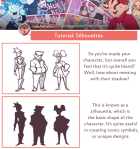
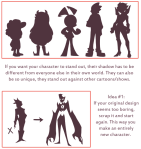
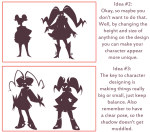
This one was fun to do since I usually leave silhouettes till after I design my character. Starting with them is quite interesting as it feels like I’m molding a character out of clay. I hope this was helpful!
Yo! Get full access to all my tutorials/references through: Patreon:
[https://www.patreon.com/lunaartgallery] or Paypal Order: the 10$ package will get you 15 items of anything available on my Patreon, emailed directly to you.
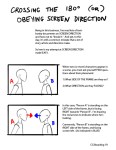
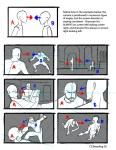
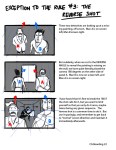
Hey kids! If you’re a filmmaker, animator, or storyboard artist and you don’t know what screen direction is, you might want to read this.
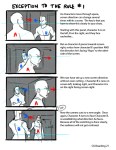
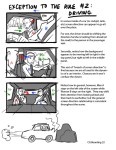
For the record, there are always exceptions to the rule in filmmaking, which is why I pointed out 3 examples here.
I’ve also found that comic books tend to NOT take screen direction as seriously as film does, but I’m still on the fence if this is wise or not. My favorite comics pay close attention to screen direction so as to not confuse the reader.
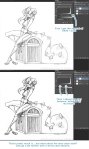
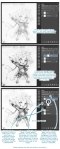
Start off with a crappy scanned/phone taken picture like so
Mess around with the SAI Filters, I usually go color deepen all the way to the left then mess with brightness and contrast until I find a good balance I like, then to top it off with a copied layer on multiply to make the lines darker
Click what I boxed off and the magic has already happened you now are left with a clean lineart layer that you can color underneath to your liking : 0 Hell you can even color your lines however you want as well for a colored lineart
ok i wasn’t going to reblog this first but honestly this is such a life/time saver. you can get a neat lineart in minutes instead of using a hour (or more) on ‘copying’ the lineart digitally. share this as much as you can. especially since it’s on sai which is what most aspiring artists on this site use…
That means free access to Photoshop CS2 – and that already has most of what you could ask for, really.
All you have to do is create a FREE ADOBE ID.
I am not sure about commercial use, but MAN. FUCKIN’ SWEET DUDE
Reblogging for the greater good.
I’m unlikely to pick it up as I honestly never use PS anymore, but here everyone who follows me. Free stuff.
oh wow this is perfect i was just lamenting that i’d have to buy creative suite for my new laptop WELP
Signal boost for any of my followers who need art programs!
The cs2 programs date back only a few years, and still have much of the functionality of today’s more modern ones. The differences between most of the versions are little more than slight modifications or additions of minor features, and UI changes. Go for it guys!!






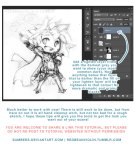
Click what I boxed off and the magic has already happened
you now are left with a clean lineart layer that you can color underneath to your liking : 0 Hell you can even color your lines however you want as well for a colored lineart





 kluskiwszechmocy