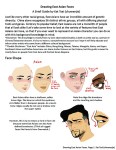
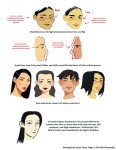
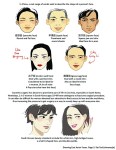
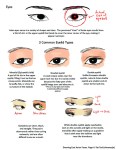
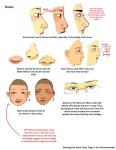
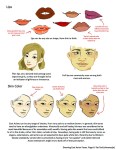
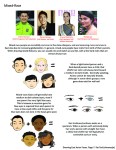
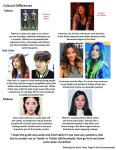
A compilation of stuff I know about drawing Asian faces and Asian culture! I feel like many “How-To-Draw” tutorials often default to European faces and are not really helpful when drawing people of other races. So I thought I’d put this together in case anyone is interested! Feel free to share this guide and shoot me questions if you have any! I’m by no means an expert, I just know a few things from drawing experience and from my own cultural background.
hank you, im really glad you like it! I usually use SAI to draw and Adobe Photoshop Elements 2.0 (yes its absolutely ancient i knooow) to add certain effects i cant quite recreate in SAI
to get that fuzzy effect, i have the entire image on one layer and duplicate it, changing the opacity of the copy to around 30-40%
then i hide the copy for a bit, and select the background. there, i apply the “diffuse” filter found right here:
the “lighten only” mode, creates a base to get that “scanned pencil lines” look which helps to make it look more like a screencap of an older anime.
(i found that this works best with clear lines and cell shading)
then, still on the background layer, i get a gaussian blur filter going, found over here:
a radius of 1-2 pixels blurs the whole deal out a little to make it look like its a good ol low quality screencap
then i go back to the other layer and, using the same gaussian blur filter but a radius of 15-20 pixels, get that foggy feel going!
this step is the most important as it creates that dreamy, foggy feeling which helps to make it look like ye olde animes
lastly, i clean up some highlights that might’ve gotten washed away by all the blurring, and we’re done!
of course you can always do more things like add a texture to make it a little grainy, or resize the canvas to fit the average dimensions for most old animes, or do something difficult and technical with the colors which i know nothing about, but i feel like this process is a pretty alright method to satisfy those ~ a e s t h e t i c ~ cravings!
(quick before/after)
i hope this helps, im sorry this turned out so long…..feel free to ask me to clarify if anything isnt clear!
So recently I came across a fellow artist who was struggling to find a free art program, and considering dropping the large amount of money for a Photoshop license. I know not everyone can afford such an expensive program, so I’ve compiled a list of programs with no cost to download and use.
Keep in mind all computers are different, so not all will work for everyone. Also, I’ve only ever used Windows, so for the most part, I’m not sure if everything will work for Mac. if in doubt check the website linked.
If you know more free programs, please add onto this!
OpenToonz has made many improvements since it’s initial release! (Windows & Mac)
Medibang Paint is a comic drawing software forked from FireAlpaca mentioned earlier in this post, and is available for mobile devices as well! (Windows, Mac, iOS, Android)
reblogging so i remember to download SAI for Mac later
Perun: the sky tears open with thunder – are you scared or are you one with the storm?
Veles: someone breaks a promise that meant everything to you – what do you do?
Jarilo: the spring came and with it the memories – which spring do you remember best and why?
Morana: the time of your death has come but you are given a choice – how do you want to go?
Mokosh: a plant grows on your grave after you die, carrying a piece of your soul – what plant would it be?
Svarog: summer’s sun burns your skin and breaks your heart – which summer do you regret the most?
Zorja Utrennjaja: you open your eyes to the delicate light of dawn – what is the first thing you think about?
Zorja Vechernjaja: the sky is dark and the air sweet – what pleasure do you long for?
Leshy: you walk through a forest filled with whispers and hungry eyes – do you stray from the path?
Baba Yaga: the night is heavy and bitter – what is the worst nightmare you ever had?
Topielec: you wade in water on a quiet evening – is it a lake, a river, or maybe sea?
Żmij: you see before you a creature of hundred eyes and sly smiles – do you banish it or befriend it?
If you’re an artist who likes to work really close, (like me), do yourself a favor and put up two views. You can do this by clicking View–> New on your toolbar.
There’s nothing worse than finally zooming out and realizing what you were doing was very wrong. This saved me a lot of grief tbh. I’m sure everyone knows this already but ._.;; I arrived quite late to that party.
WHAT
That’s amazing..
Does this work for Photoshop?
For Photoshop you’ll wanna go to Window > Arrange > New Window for [Document].
BRINGING THIS BACK BECAUSE YOU HAVE NO IDEA HOW HELPFUL THIS HAS BEEN. This will save you hours and hours of backtracking (fixing a thing close up, zooming back out and realizing that the thing you fixed doesn’t work with the rest of the picture–rinse and repeat). As someone who uses the ‘squint and see if it looks right’ method of drawing anatomy, the tiny window is a goddamned life saver.
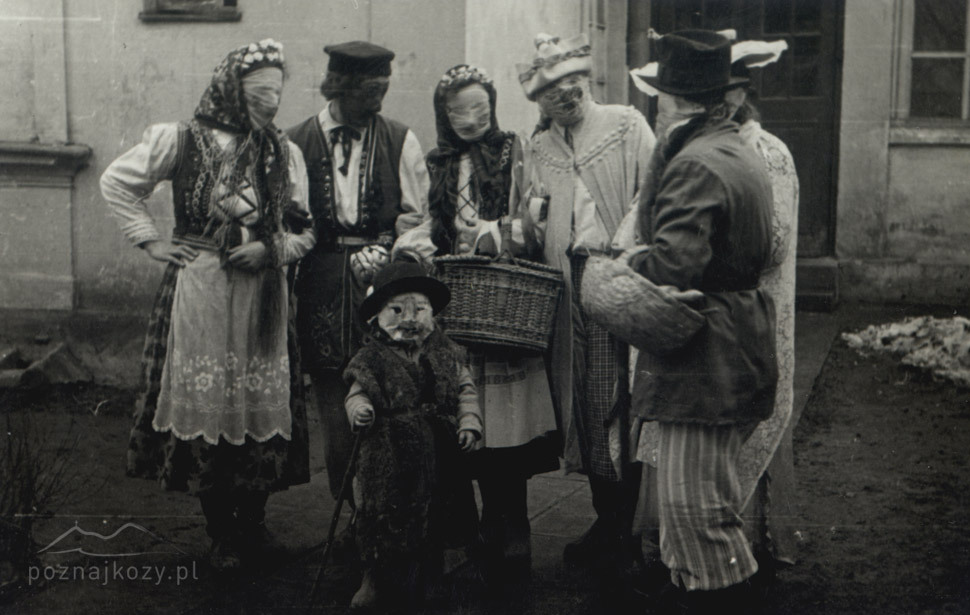
‘Śmierguśnicy*’, who might be called ‘Easter carolers’ or ‘spring carolers’, are ritual groups of dressed-up people who walk from house to house in order to pour water on people on the Easter Monday, and ask for small treats in return (for example pisanki – the decorated eggs). The custom survived in various regions across Poland, notably around villages of Wilamowice and Limanowa. This tradition bears traces to old Slavic customs of ritual purification for the beginning of spring.
Other local names: ‘śmiguśnioki’, ‘dziady śmigustne’, ‘siwki’







 kluskiwszechmocy